Flexible Shift Scheduling On the Fly
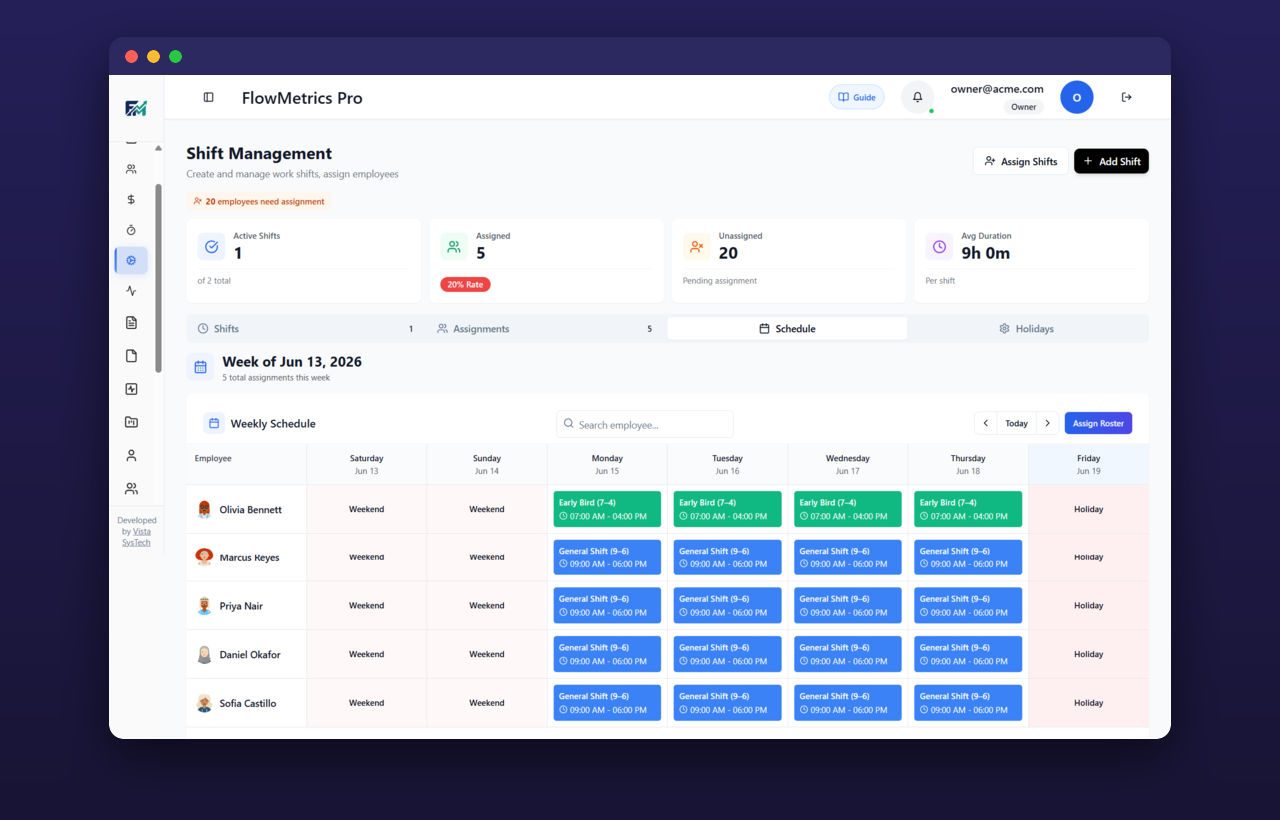
Create unlimited shifts, assign and reassign in seconds, and give every employee a clear weekly view. Clock-in validation keeps the roster honest.
Key Benefits
Plan coverage with confidence and adapt instantly when the day changes.
Unlimited Shifts
Define as many shifts as your operation needs, from fixed hours to rotating patterns, with no limits.
Assign & Reassign
Assign, reassign, or override shifts on the fly as staffing needs shift throughout the week.
Weekly Schedule View
Every employee gets a clear weekly schedule view so they always know when and where they are working.
Clock-In Validation
Shifts are validated at clock-in time, catching early, late, or off-shift punches before they cause payroll headaches.
How It Works
Build and manage your roster in four straightforward steps.
Create Shifts
Set up unlimited shifts with start and end times, breaks, and rules that fit how your teams actually work.
Assign Employees
Drop employees onto shifts and reassign or override them instantly when plans change.
Validate at Clock-In
The system checks each punch against the assigned shift, flagging anything outside the expected window.
Track Utilization
Review roster stats and utilization to spot gaps, overstaffing, and coverage trends across the team.
Plan Availability
Shift scheduling is available on Starter, Professional, and Enterprise plans.
Free
Not included
blockNot Included
Starter
Full access
check_circleIncluded
Professional
Full access
check_circleIncluded
Enterprise
Full access
check_circleIncluded
Take Control of Your Roster
Start your 14-day free trial. No credit card required. Build shifts, assign coverage, and validate every clock-in with ease.